> ## Documentation Index
> Fetch the complete documentation index at: https://bruno-a6972042-docs-timeline-scripts.mintlify.site/llms.txt
> Use this file to discover all available pages before exploring further.
# Timeline
> Inspect the main request, script-triggered HTTP calls, and console output in one chronological view.
**Timeline** tab shows everything that happened during a request run. It includes the main HTTP call, any extra requests made from scripts, and the resolved request details for each step.
## Timeline Interface
The Timeline tab is organized into three categories:
1. **Request**
2. **Response**
3. **Network Logs**
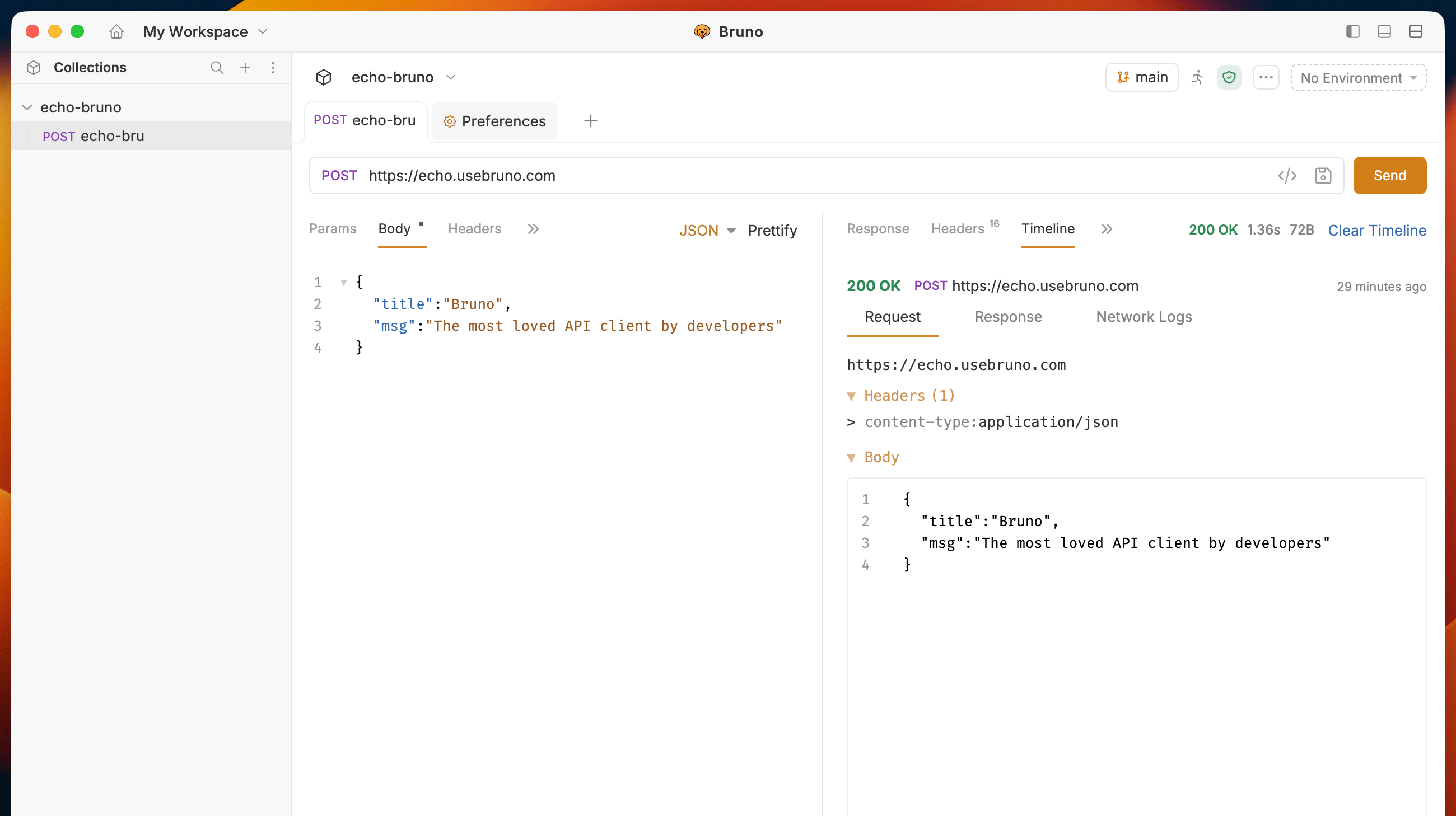 ### 1. Request Tab
The Request tab displays everything that was sent with your API request:
* **URL** - The complete endpoint URL
* **Query Parameters** - Query strings and path variables
* **Request Body** - The data payload sent with the request
* **Request Headers** - All headers included in the request
* **Authentication** - Authentication details and credentials
* **Variables** - Variables used in the request
### 2. Response Tab
The Response tab shows all information received from the server:
* **Status Code** - HTTP status code of the response
* **Response Headers** - All headers returned by the server
* **Response Body** - The complete response data
* **Response Size** - Size of the response payload
* **Execution Time** - Time taken to complete the request
### 3. Network Logs Tab
The Network Logs tab provides low-level network insights for advanced debugging:
* **Request/Response Flow** - Detailed timeline of the network transaction
* **Network Timing** - Breakdown of connection, DNS, SSL, and transfer times
* **Protocol Details** - HTTP version and connection information
* **Debugging Information** - Additional network-level diagnostics
This comprehensive view helps you identify performance bottlenecks, debug connection issues, and understand the complete lifecycle of your API requests.
## Script Logs in Timeline
When scripts use [`bru.sendRequest()`](/testing/script/javascript-reference#brusendrequestoptions-callback) or [`bru.runRequest()`](/testing/script/javascript-reference#brurunrequestrequestpathname), Timeline lists every HTTP call made during the run. Use the filter tabs to narrow the view.
### 1. Request Tab
The Request tab displays everything that was sent with your API request:
* **URL** - The complete endpoint URL
* **Query Parameters** - Query strings and path variables
* **Request Body** - The data payload sent with the request
* **Request Headers** - All headers included in the request
* **Authentication** - Authentication details and credentials
* **Variables** - Variables used in the request
### 2. Response Tab
The Response tab shows all information received from the server:
* **Status Code** - HTTP status code of the response
* **Response Headers** - All headers returned by the server
* **Response Body** - The complete response data
* **Response Size** - Size of the response payload
* **Execution Time** - Time taken to complete the request
### 3. Network Logs Tab
The Network Logs tab provides low-level network insights for advanced debugging:
* **Request/Response Flow** - Detailed timeline of the network transaction
* **Network Timing** - Breakdown of connection, DNS, SSL, and transfer times
* **Protocol Details** - HTTP version and connection information
* **Debugging Information** - Additional network-level diagnostics
This comprehensive view helps you identify performance bottlenecks, debug connection issues, and understand the complete lifecycle of your API requests.
## Script Logs in Timeline
When scripts use [`bru.sendRequest()`](/testing/script/javascript-reference#brusendrequestoptions-callback) or [`bru.runRequest()`](/testing/script/javascript-reference#brurunrequestrequestpathname), Timeline lists every HTTP call made during the run. Use the filter tabs to narrow the view.
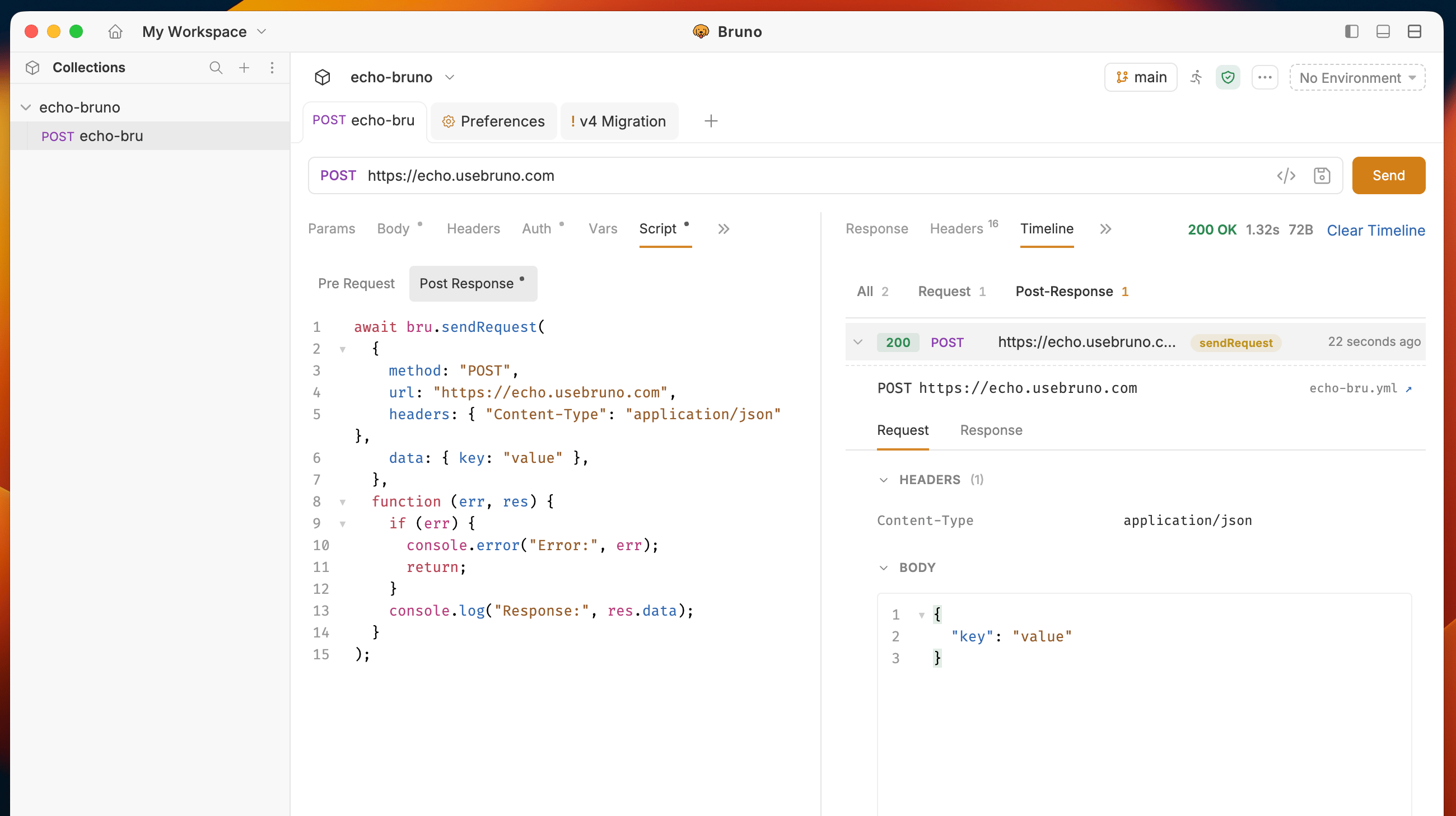 The number on each tab is how many requests match that filter.
| Tab | What it shows |
| ----------------- | ------------------------------------------------------------------------------------------------------------------------------------------------------------------- |
| **All** | Every HTTP request from the run including the main request plus any calls made from scripts (with or without `sendRequest` / `runRequest`). |
| **Request** | Only the **main request** — the HTTP call defined in the request URL bar (method, URL, body, and headers you configured in Bruno). |
| **Pre-Request** | Only HTTP requests executed during the **pre-request script** phase (from `bru.sendRequest()` or `bru.runRequest()` before the main request is sent). |
| **Post-Response** | Only HTTP requests executed during the **post-response** or **test** script phase (from `bru.sendRequest()` or `bru.runRequest()` after the main response returns). |
Click a row to expand it and inspect that call's request body, headers, response, and network timing. Use **Clear Timeline** to reset the list before the next run.
The number on each tab is how many requests match that filter.
| Tab | What it shows |
| ----------------- | ------------------------------------------------------------------------------------------------------------------------------------------------------------------- |
| **All** | Every HTTP request from the run including the main request plus any calls made from scripts (with or without `sendRequest` / `runRequest`). |
| **Request** | Only the **main request** — the HTTP call defined in the request URL bar (method, URL, body, and headers you configured in Bruno). |
| **Pre-Request** | Only HTTP requests executed during the **pre-request script** phase (from `bru.sendRequest()` or `bru.runRequest()` before the main request is sent). |
| **Post-Response** | Only HTTP requests executed during the **post-response** or **test** script phase (from `bru.sendRequest()` or `bru.runRequest()` after the main response returns). |
Click a row to expand it and inspect that call's request body, headers, response, and network timing. Use **Clear Timeline** to reset the list before the next run.